The dream of creating your own video game has long been a tantalizing prospect for countless creative minds. Whether it’s a whimsical platformer starring a mischievous cat, a brain-bending puzzle that challenges the sharpest intellects, or an addictive arcade experience, the desire to bring these ideas to life is powerful. However, for many, the journey from concept to playable reality is immediately halted by a formidable barrier: the steep learning curve of traditional programming. The thought of mastering complex languages like C# or Python just to animate a character or implement a scoring system can feel insurmountable.
Fortunately, the landscape of game development is undergoing a revolution, democratizing the creation process like never before. You no longer need to be a seasoned programmer to bring your game ideas to life. This article will guide you through the exciting process of building your very first online game in just one day, using the power of no-code tools. We’ll explore how a codeless approach can empower you to create engaging web apps and mobile apps rapidly, focusing on faster prototyping and instant sharing & feedback. Get ready to transform your creative vision into a playable reality, proving that game development is accessible to everyone.
What no-code game making really is?
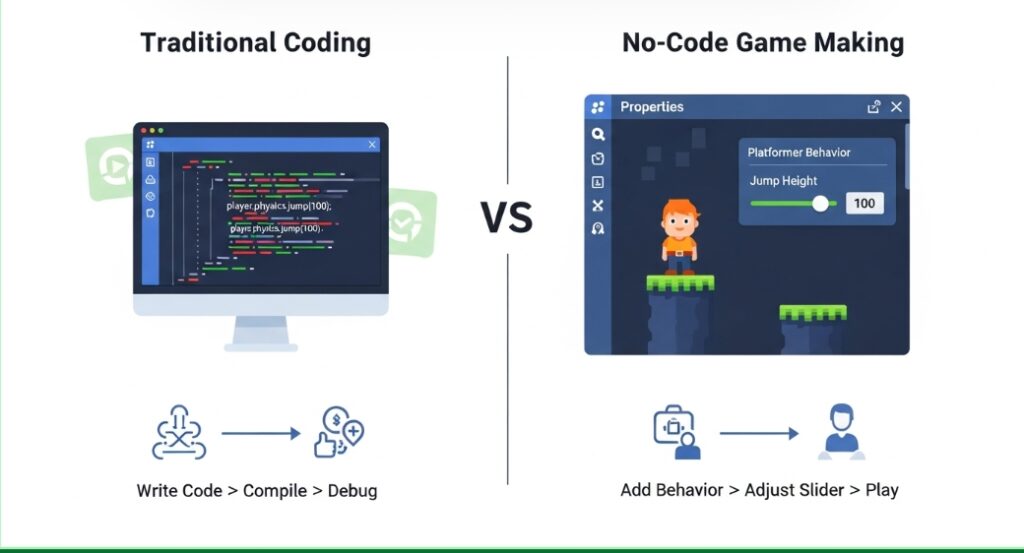
The term “no-code” might initially sound like a marketing buzzword, but it represents a fundamental shift in how software, including games, can be developed. At its core, a no-code app builder or a dedicated no-code game maker replaces the traditional text-based coding environment with a highly visual and intuitive interface. Instead of wrestling with syntax errors and complex logic structures, you interact with drag-and-drop tools and pre-built components within a declarative interface. This means you define what you want your game to do, and the underlying system translates those instructions into functional code.
This codeless approach allows creative minds and aspiring game designers to focus on game mechanics, user flows, and overall UX/UI design without getting bogged down in the intricacies of programming languages. For example, to make a character jump, you wouldn’t write lines of code to define physics parameters. Instead, you’d typically select a “Platformer Character” behavior from a menu within the app builder and adjust parameters like jump height through simple sliders or input fields. This visual paradigm dramatically speeds up the app building process, making it possible to create functional no-code apps and even video game prototypes in a fraction of the time it would take with traditional coding. The goal is to provide a Zero code experience, where the emphasis is purely on creative implementation.
Pick the best no-code tool for a 1-day win
To successfully conquer the challenge of building a game in a single day, selecting the right no-code platform is paramount. The key is choosing a tool that minimizes friction and maximizes your ability to iterate rapidly. If you spend a significant portion of your precious 24 hours on software installation, environment setup, or debugging foundational drivers, you’ve already lost valuable creative time. Therefore, prioritizing tools that are immediately accessible and designed for rapid development is crucial for achieving your goal.
Look for no-code tools that are browser-based. This eliminates the need for local installations and allows you to start building the moment inspiration strikes. Such platforms facilitate faster prototyping by enabling you to open a web tab and immediately begin crafting your game, streamlining the instant sharing & feedback loop as you can test your game within the same window where you are developing it. The best no-code app builders will also offer a rich library of built-in templates and behaviors, providing pre-coded solutions for common game mechanics.
Key Features to Look For
When selecting a no-code tool for a one-day game build, several features will significantly accelerate your progress and ensure you can deliver a functional video game prototype.
First and foremost, opt for a browser-based editor. The ability to simply open a web tab and immediately begin crafting your game removes a substantial barrier to entry. This also streamlines the feedback loop, as you can test your game instantly within the same window where you are developing it. This immediacy is crucial for faster prototyping.
Secondly, prioritize tools that offer a rich library of built-in templates and behaviors. You don’t want to spend hours coding fundamental mechanics like gravity or character movement from scratch. Look for engines that already understand how physics works and provide pre-made behaviors such as “solid object,” “8-direction movement,” or “destroy outside layout.” This allows you to delegate complex logic to the no-code platform and focus on assembling your game.
A robust UI builder is also essential. This allows you to design visually appealing menus, score displays, and game over screens without writing code. The declarative interface of these tools means you can arrange elements precisely where you want them. Furthermore, consider tools that simplify the process of defining user flows, enabling you to visually map out game progression and interactions. Finally, look for app builders that offer easy export options for web deployment, as this is key to achieving “online game, no download” status.
Top No-Code Game Makers for Quick Online Games
To ensure you can hit the ground running and build a playable online game within a single day, several no-code platforms stand out for rapid development. These tools combine visual logic systems, built-in assets, and simplified deployment, making them ideal for fast iteration and experimentation.
GDevelop is an excellent choice for 2D casual and action games. It uses an event-based logic system that is completely free, runs directly in the browser, and supports one-click web export. An extensive library of tutorials and pre-made “behaviors” handles much of the heavy lifting, allowing creators to focus on gameplay rather than implementation details. Its declarative interface and drag-and-drop workflow make GDevelop a strong no-code app builder for beginners.
Construct 3 is a powerhouse for creating polished 2D online games. Known for its industry-standard event sheets and exceptional performance, Construct 3 also operates entirely in the browser. It includes a robust UI builder, instant previews, and streamlined asset management, enabling extremely fast prototyping and refinement. Its codeless approach is ideal for creators aiming to ship a high-quality game in a single day.
Astrocade is purpose-built for fast multiplayer and social game creation. It provides a no-code visual editor paired with built-in cloud multiplayer infrastructure, removing the need to manage servers or networking logic. Because real-time online features are available out of the box, Astrocade is especially well-suited for quick online games, social experiments, and multiplayer prototypes that need to be playable and shareable almost immediately.
Together, these platforms demonstrate how powerful no-code game development has become. By abstracting away traditional programming and backend complexity, they enable creators to rapidly prototype, test, and publish online games without writing a single line of code—perfect for one-day builds and quick-release projects.
Plan a One-Day, One-Screen Casual Game
The most critical factor in achieving your goal of building a game in one day is scope management. The biggest pitfall for first-time developers is the temptation of “scope creep,” where the project balloons beyond its initial, achievable targets. You cannot realistically expect to build a sprawling RPG with a 40-hour narrative or a complex multiplayer arena within a 24-hour window. Instead, the focus must be on creating a video game prototype that is intentionally small and tightly scoped – a “micro-game.” This focused approach ensures that you can deliver a complete, functional experience by the end of the day, providing a solid foundation for future development.
Your objective for this one-day sprint is to create a simple, single-screen casual game. This could be a hypercasual arcade game, a basic puzzle, or an endless runner. By limiting the scope to one screen and one core gameplay loop, you minimize the complexity of level design, asset creation, and logic implementation. This deliberate constraint is what makes building a playable game in such a short timeframe not just possible, but probable. The resulting no-code app will be a testament to focused design and the power of accessible development tools.
Choose a simple, addictive game idea
To maintain a tight scope, think about the core mechanics of the casual games you frequently encounter on your mobile devices or play during brief breaks. These games typically revolve around a single, well-defined core loop that is easy to understand and quick to play. Consider concepts like:
- Endless Runner: The player must jump over obstacles or collect items to survive for as long as possible. Think Flappy Bird or Subway Surfers.
- Clicker/Tapper: Rapidly click or tap on elements that appear on screen before they disappear, often to earn points or currency. Examples include Cookie Clicker or many simple arcade games.
- Physics Puzzle: Manipulate the environment to guide an object into a target, relying on simulated physics. Games like Angry Birds fall into this category, though complex physics might be too much for a one-day build.
- Reaction Game: Test reflexes by tapping or clicking in response to visual cues.
Your objective for the day is to articulate your game’s core loop in a single, clear sentence. For example: “The player taps the screen to make a bird flap its wings and ascend, navigating through gaps between pipes to avoid collision and earn points.” This clarity will guide your development process and prevent feature creep. This focus on a single, engaging loop is what makes games viral-friendly and achievable within a short timeframe, a perfect use case for no-code tools.
Design for Online Play and Sharing
If your aspiration is for people to “play with friends online,” you must design the game with shareability and asynchronous competition in mind. Attempting to build real-time, server-side multiplayer functionality typically takes weeks of dedicated development and is far beyond the scope of a one-day project. Instead, focus on implementing a robust high-score system. This is where Google Sheets can surprisingly become a valuable ally, acting as a simple backend for tracking scores.
The ideal game loop for this approach is short, typically lasting between 30 to 60 seconds per round. This brevity makes it easy for players to challenge each other. Imagine sending a link to a group chat with the message, “I just scored 500 points, bet you can’t beat it!” This strategy perfectly aligns with the “online game, no download” paradigm, ensuring instant loading, quick play sessions, and effortless sharing. The game’s user flows should prioritize getting players into the action quickly and presenting their score clearly at the end, encouraging them to share their achievements. This emphasis on shareability within your no-code app ensures that even a simple prototype can generate engagement.
Step-by-Step: Build Your First Online Game in One Day
With a clear plan, a focused game idea, and the right no-code tools selected, you’re ready to embark on your 24-hour game development journey. This blueprint breaks down the process into manageable stages, ensuring steady progress towards a playable, shareable game. Remember, the goal is completion and learning, not perfection. We’ll leverage the intuitive nature of no-code platforms and integrate familiar tools like Google Sheets to manage your game’s data seamlessly. This structured approach, utilizing drag-and-drop tools and a declarative interface, will make game development an accessible and rewarding experience, even for complete beginners.
Step 1 – Get your no-code tool ready fast
Begin by navigating to your chosen no-code game maker (such as GDevelop or Construct 3) and create an account if you haven’t already. Initiate a new project. To maximize your time, avoid starting from a completely blank canvas. Instead, select a template that closely matches your game idea. For example, if you’re building an endless runner, leverage the “Endless Runner” starter kit provided by the tool. These templates are designed to provide a solid starting point with pre-configured elements and basic mechanics, embodying the spirit of faster prototyping.
Dedicate the first 30 minutes to familiarizing yourself with the editor’s interface. Identify key areas such as the Scene View (where you’ll place and arrange game objects), the Asset Library (your source for sprites and visual elements), and the Event Sheet or Logic Editor (where you’ll define your game’s rules and behaviors). Understanding this workspace is fundamental to navigating the app builder efficiently. This initial setup is part of the app building process that requires no coding, relying entirely on visual cues and a declarative interface.
Step 2 – Build something playable right away
With your workspace familiarized, it’s time to start constructing the core of your game using the no-code platform. Begin by removing or rearranging any placeholder art within your chosen template. Introduce your primary “Player” object and assign it a relevant behavior, such as “Platformer Object” or “8-Direction Movement.” Next, add a “Ground” or “Platform” object and give it a “Solid” behavior. This ensures your player can interact with the environment realistically. These behaviors are pre-built functions within the no-code tool that handle complex programming logic, allowing you to achieve functionality with simple selections.
Immediately after setting up these basic elements, press the “Preview” or “Play” button to test your initial setup. Can your character move? Can it jump? If the answer is yes, you’ve already achieved a foundational level of playability. If not, review the assigned behaviors. Relying on these pre-built, robust behaviors from your no-code platform is key to rapid development. This visual approach to defining user flows ensures that your game feels responsive and functional early on, embodying the principle of faster prototyping.
Step 3 – Add rules, score & win/lose moments
A character jumping on a static platform is more of an interactive toy than a game. To transform your creation into a true game, you need to implement rules, objectives, and consequences using the no-code app builder’s visual logic editor. Navigate to your event sheet or logic editor. You’ll construct logic that, for example, states:
- Condition: Player collides with an Enemy.
- Action: Restart the current layout (or subtract from player Health).
Next, integrate a scoring system. This is where Google Sheets can become incredibly useful. You can set up a database schema with a simple database table for scores, perhaps including a player name and their score. Your no-code platform can then be configured to read from and write to this cloud-based spreadsheet. You might define a rule like:
- Condition: Player collects a Coin.
- Action: Add 10 to the Score variable and update the score in Google Sheets.
Finally, establish clear win or lose states. For instance, if the player falls off the screen or fails to complete an objective, trigger an action to display a “Game Over” screen or a specific text object. This structured approach to defining game objectives ensures players understand what they need to achieve, forming crucial user flows within your no-code app.
Step 4 – Add cool looks, sounds & menus
By mid-afternoon, your game should be functionally operational, though it might currently resemble a collection of gray boxes moving against a plain background. This is the stage for polish and presentation, leveraging the UI builder capabilities of your no-code tool. Utilize your no-code game maker’s built-in asset store or browse free asset repositories online to replace placeholder graphics with appealing sprites, sci-fi elements, or charming characters. For a one-day project, resist the urge to create your own custom art; free, high-quality assets will keep you moving forward efficiently.
Develop a simple User Interface (UI) that enhances the player’s experience. This typically includes a Title Screen with a prominent “Play” button and a “Game Over” screen that offers a “Retry” option. Sound is also a critical element that significantly elevates the perceived quality of your game. Many no-code platforms offer libraries of sound effects and background music that can be easily integrated. This attention to visual and auditory polish transforms your basic functional prototype into a more engaging experience, demonstrating the power of the declarative interface to create appealing customer-facing web-based applications.
Step 5 – Test like crazy & fix the bugs
With the core features implemented and the game looking and sounding more presentable, dedicate the final hours of your development day to rigorous playtesting. Play the game repeatedly, actively seeking out bugs and inconsistencies. As you identify issues, implement fixes promptly using the drag-and-drop tools and visual logic. For instance, if the game feels excessively difficult, consider slowing down enemy movement or increasing the size of collectible items. Conversely, if it’s too easy, perhaps reduce platforming opportunities or shrink power-up durations.
Crucially, test your game in different environments. If your no-code platform supports it, preview your game on a mobile device or in an alternative web browser. Ensuring that your “online free game” runs smoothly and as intended for a wide audience is essential for successful deployment and instant sharing & feedback. This iterative testing and fixing process is a vital part of app building, even with a codeless approach, and helps refine the overall user flows.
Launch your game online
As the day draws to a close, you’ve reached the exhilarating stage of releasing your creation to the world. The culmination of your focused effort is a playable game ready for others to experience. This is where the magic of no-code tools truly shines, abstracting away complex deployment processes and allowing you to focus on sharing your accomplishment.
Publish it to the web in minutes
Locate the “Export” or “Publish” button within your no-code game maker. Select the “Web” or “HTML5” option. Many platforms, like GDevelop, offer their own integrated hosting solutions, such as liluo.io, or provide straightforward integration with popular game distribution sites like Itch.io.
Upon publishing, the platform will typically generate a unique URL for your game. This is where the magic of modern no-code platform development truly shines: you don’t need to purchase a domain name, set up a web server, or manage complex hosting configurations. Your game will live entirely in the cloud, accessible to anyone with a web browser. This seamless deployment is a hallmark of the “online game, no download” ecosystem, facilitating immediate access and broad reach for your customer-facing web-based applications. While advanced users might later explore connecting custom API endpoints for more complex features, for this one-day project, the platform’s built-in hosting handles everything, leveraging underlying cloud infrastructure and a simplified deployment pipeline without you needing to worry about it.
Turn It into a Social, Shareable Game
Once you have your game’s URL, the next step is to make it a social event. Copy this link and share it across your preferred communication channels: your family WhatsApp group, your Discord server, your social media feed, or email it to friends. Frame it as a challenge: “I just scored 450 points in this game I made today, who can beat my score?” By actively encouraging competition, you transform your simple project into a shareable social experience.
Because players can launch and play the game instantly in their browsers, the barrier to entry is virtually zero. This immediate accessibility fosters engagement and can lead to organic sharing and feedback, crucial for instant sharing & feedback. Even though you’re not dealing with direct multiplayer, the high-score system, potentially powered by Google Sheets, adds a competitive layer. This makes your no-code app more engaging and encourages repeat play, turning your one-day project into a fun social activity.
What You Can (and Can’t) Do in One Day
It’s important to maintain realistic expectations about what can be accomplished within a single 24-hour development sprint. The goal of this exercise is not to create the next blockbuster title like Fortnite or a complex multiplayer arena. Building a game with sophisticated AI features and intricate AI orchestration, for example, is typically a multi-month or multi-year endeavor. Similarly, complex networking for real-time multiplayer, detailed story arcs, or extensive database schemas for large player bases are beyond the scope of a single day. The emphasis is on delivering a functional, enjoyable core experience.
Games you can actually finish tonight
Within a single day, you can realistically expect to create a game with a single mode, featuring basic visuals, a working core gameplay loop, and fundamental win/lose conditions. This might include elements like a scoring system, simple enemy AI (if using basic no-code AI features), and a basic UI with start and end screens. The objective is not to build a commercial masterpiece but to finish something. A playable, perhaps slightly buggy, but fun 30-second game loop is infinitely more valuable than a theoretically perfect, yet perpetually imaginary, RPG. This achievable goal provides immense satisfaction and a tangible output for your efforts, showcasing the power of your no-code platform and your own creativity. For instance, you could implement basic enemy movement patterns using AI orchestration to add a touch of challenge, or use Google Sheets to store player progression for a very simple save system.
What to do next after your first game
Congratulations on completing your first online game! You’ve officially broken the seal on game development and proven to yourself that creating interactive experiences is within your reach. Now that you have this foundational experience, the possibilities for further growth are vast.
On the very next day, you could focus on adding a second level or introducing a new enemy type. In the following week, you might explore how to incorporate custom animations, integrate more sophisticated sound effects, or even investigate advanced no-code AI tools that can assist with generating dialogue, character backstories, or even complex game logic through AI orchestration. You could also delve into how Google Sheets can serve as a more robust backend for your game, managing player data, leaderboards, or in-game inventories, moving beyond simple database tables to more complex data storage.
Consider expanding your app building skills by exploring how your game could evolve into a larger full-stack app. This might involve integrating with external services via API endpoints using an API connector, though this is a more advanced step. You could also look into how no-code AI can be used for more sophisticated game design tasks, perhaps even exploring tools that leverage Vertex AI or similar technologies for generative content. Think about how your video game prototype could be expanded into customer-facing web-based applications for various purposes beyond gaming, such as creating interactive tools for onboarding employees, tracking production in a business context, or even developing sales funnels. The skills you’ve gained using no-code tools and their declarative interface are transferable across many industries.
Conclusion
The journey from a fleeting game idea to a playable, shareable online experience is now more accessible than ever, thanks to the transformative power of no-code tools. As we’ve explored, by leveraging intuitive app builders like GDevelop or Construct 3, coupled with the surprising versatility of Google Sheets for data management, you can indeed build your first online game in a single day. This codeless approach, utilizing drag-and-drop tools and declarative interfaces, demystifies game development, making it a realistic endeavor for creative minds, UX/UI Designer professionals, and anyone with a passion for interactive storytelling.
We’ve seen how focusing on a simple, single-screen casual game with a clear core loop is paramount for success within a 24-hour timeframe. By prioritizing readily available templates, pre-built behaviors, and visual logic editors, you can bypass the complexities of traditional coding and achieve faster prototyping and instant sharing & feedback. The ability to publish your game directly to the web with minimal effort, creating accessible web apps and laying the groundwork for potential mobile apps, democratizes creation and fosters immediate engagement. While advanced features like real-time multiplayer or deep AI orchestration are beyond a one-day scope, the foundational skills and the satisfaction of launching your own playable no-code app are invaluable. Your first game is not just an accomplishment; it’s a springboard for further learning, a testament to the power of accessible technology, and the beginning of your game development journey.
1. Do I really need any coding experience to make a game in one day?
Nope! That’s the whole point of no-code tools like GDevelop or Construct 3. You drag, drop, click behaviors, and adjust sliders, no typing code at all. Perfect even if you’ve never programmed before.
2. Which no-code tool should I start with if I’m a complete beginner?
GDevelop is usually the easiest and friendliest choice for your first day. It’s 100% free, works straight in your browser, has tons of ready-made templates, and lets you publish online with one click.
3. Can I really finish a playable game in just 24 hours?
Yes, but only if you keep it super simple: one screen, one core mechanic (like tapping to jump or endless runner style), basic score, and quick win/lose. Scope creep kills most one-day projects, so stay tiny and focused.
4. What kinds of games work best for a one-day build?
Hyper-casual stuff: Flappy Bird-style tapper, endless runner, simple clicker, or basic reaction game. Anything with a 30–60 second loop that’s easy to explain in one sentence.
5. How do I make my game shareable so friends can compete?
Add a score that saves to Google Sheets (many no-code tools support this easily), publish the game to the web, grab the link, and send it with a challenge: “Beat my 520 points!” No real-time multiplayer needed, high scores create the fun competition.
6. Do I need to make my own art and music?
Not at all for day one. Use free assets from the tool’s built-in library, OpenGameArt.org, Kenney.nl, or itch.io. Grab ready sprites, sound effects, and background music — it’ll look and sound way better than gray boxes in minutes.
